CouchDeck Lets You Control Your Windows PC From a Phone Browser
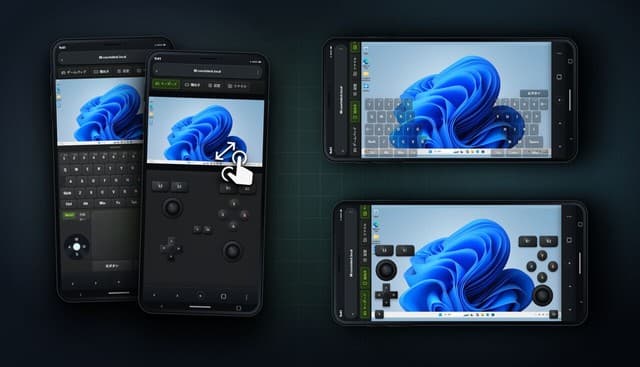

A new tool called CouchDeck is set to let players remotely control a Windows PC directly from their smartphone’s browser, with a release scheduled for September 23, 2026. The software’s digital store page has gone live ahead of launch, and notably, it requires no dedicated smartphone app. Instead, users connect by scanning a QR code displayed on the PC or by opening the connection URL directly. After the first connection, the phone’s browser remembers the PC, so later sessions simply require refreshing the remote control page rather than scanning again.
The user interface is designed to fit the screen view, keyboard, and touchpad into a single page, keeping everything within easy reach. A full set of keys is included, covering function keys and a numeric keypad, and three-key combinations such as Ctrl+Shift+S are supported. Beyond conventional keyboard input, users can also type using smartphone-style text input, with the input method switchable at any time during a session.

CouchDeck also functions as a virtual gamepad, letting users play games with pad-style controls including buttons, sticks, and triggers. Button layouts can be selected in Xbox or PlayStation styles, and the arrangement of individual buttons is customizable to suit personal preference. Screen orientation can be freely switched between portrait and landscape, allowing the layout to match however players prefer to hold their device.

An additional file sharing feature is reserved for the Pro version, enabling transfers of PC files to a smartphone or consolidated uploads of phone files back to the PC. The feature supports images and videos as well as compressed archives and documents. The project is still at its announcement stage, and details such as input latency remain open questions. Still, given the convenience of browser-based remote access and the breadth of features shown, this one seems worth watching for anyone who regularly juggles between PC and mobile.